

If you've ever clicked a link and watched your browser's address bar flicker through two, three, or four different URLs before the page finally loads, you've experienced a redirect chain yourself. Most people never notice the delay, but search engine crawlers do.
This guide covers exactly what a redirect chain is, how it forms, why it's a genuine (not theoretical) SEO problem, and the concrete steps to locate and correct each chain on your site.
What Is a Redirect Chain?
A redirect chain happens when URL A redirects to URL B, which then redirects to URL C, before a visitor (or a crawler) finally reaches the true and ultimate destination; each of those separate jumps is a "hop". A direct redirect—that is, one going straight to B—is normal and mostly harmless; a chain is the result when no one cleans up after the first redirect, and a second (or third, or fifth) one got stacked on top of it.
A typical redirection chain looks something like this:
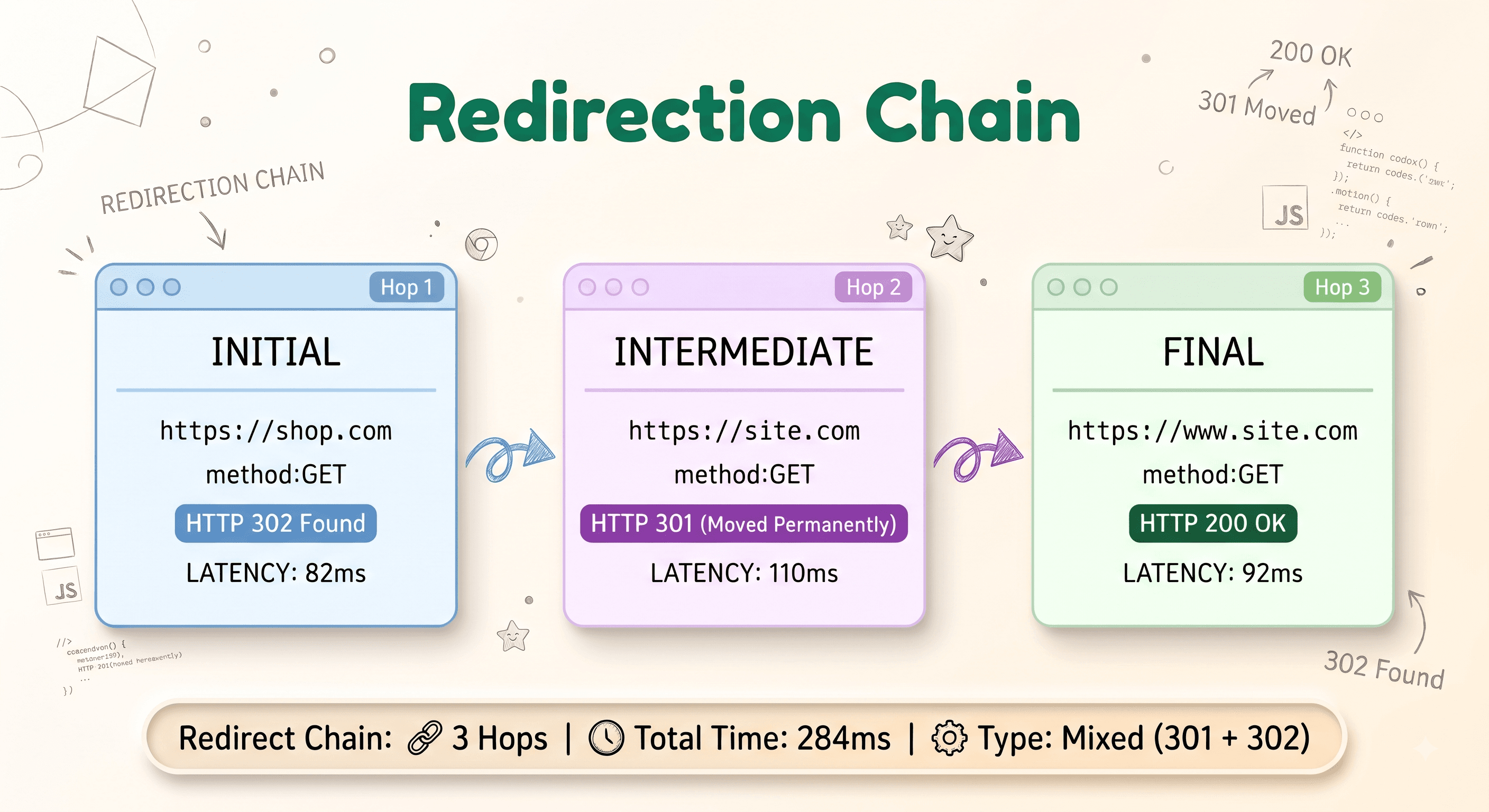
How Redirect Chains Happen
Nobody sets out to build a redirect chain on purpose — they accumulate over time. The most common causes include:
- Repeated site migrations. A page moves once during a domain change, then again during an HTTPS migration, then again during a URL structure redesign — and each migration adds its own redirect on top of the last, instead of someone going back and repointing the original redirect directly to the current URL.
- Custom code or Redirect Tools. Some redirect apps used to redirect visitors to other domains and URLs don't handle bots or crawlers properly. If the destination URL also has a redirect, it creates stacked hops that directly hurt SEO and rankings.
- CMS or platform defaults. Some platforms (Shopify included) automatically create a redirect whenever you rename a page or product handle. Rename that same page three times over a year, and you've built a three-hop chain without writing a single line of redirect rules yourself.
- www vs non-www, and http vs https, stacked separately. If your
http://→https://redirect and yournon-www→wwwredirect are configured as two separate rules instead of one combined rule, every request pays for both hops.
Redirect Chains vs a Single Redirect
It's worth being precise here, because "redirects are bad for SEO" is an oversimplification that gets repeated a lot. A single, well-configured 301 redirect is a normal, healthy part of the web — Google has said for years that a single redirect passes the vast majority of ranking signals to the destination URL. The problem isn't redirecting. The problem is stacking redirects instead of maintaining them.
Why Redirect Chains Hurt SEO
1. Crawl budget waste
Search engine crawlers allocate a limited amount of time and requests to any given site — this is what's usually called "crawl budget." Every extra hop in a chain is one more request the crawler has to make just to reach content it could have reached directly. On a large site, redirect chains scattered across thousands of URLs can meaningfully eat into the budget that should be spent discovering and re-crawling your actual content.
2. Diluted ranking signals
Each hop in a chain is an opportunity for signal loss. While a single 301 passes the large majority of link equity to its target, that's not a guarantee that repeats perfectly at every additional hop — and some redirect types (302s stacked in a chain, in particular) are historically treated more cautiously by search engines than a clean 301. String enough hops together and you're compounding a small loss multiple times instead of taking it once.
3. Slower page loads and worse Core Web Vitals
Every hop is a full round-trip to a server before the browser can even start loading the real page. Three or four hops can easily add several hundred milliseconds — sometimes more — to a page's load time before a single byte of actual content arrives. That delay shows up directly in Core Web Vitals metrics like Largest Contentful Paint, which is both a user-experience problem and a ranking factor in its own right.
4. Slower, less reliable indexing
Googlebot and other crawlers will follow a reasonable number of redirect hops, but they won't follow an unlimited number, and a long or malformed chain can cause a URL to be indexed later than it should be — or not indexed correctly at all. If a chain loops back on itself (a redirect loop), some crawlers will give up on it entirely.
5. It compounds with scale
A two-hop chain on one page is a rounding error. A two-hop chain that exists on 40,000 product URLs after a platform migration is a site-wide crawl and performance problem — and because chains form gradually, most sites don't discover the scale of it until they actually audit for it.
How Many Hops Is Too Many?
There's no official hard limit search engines publish, but the practical guidance from most technical SEOs is consistent: treat one hop as normal, two as worth fixing when you find it, and three or more as a priority fix. Every hop past the first is pure overhead with no benefit — there's no scenario where a three-hop chain does something a single redirect couldn't.
How to Identify Redirect Chains on Your Site
Manual method
You can trace a single URL by hand using your browser's network tab (or curl -IL <url> from a terminal, which follows and prints every redirect hop with its status code). This works fine for spot-checking one or two URLs you already suspect are chained.
It does not scale. Checking a few hundred URLs by hand — every internal link, every backlink target, every URL in your sitemap — is not a realistic manual process, and manual checks miss location-dependent and JavaScript-based redirects entirely, since those don't always show up in a simple header trace.
Using a redirect chain checker
For anything beyond a handful of URLs, use a dedicated redirect chain checker that follows the entire chain automatically — every hop, every status code, and the headers at each step — rather than just confirming a redirect happened.
- Every hop in order, with its individual status code (301, 302, 307, 308)
- The response headers at each hop
- The total number of hops and the final destination
- Whether the chain loops back on itself (a redirect loop, which is a more severe version of the same problem)
Run this against your sitemap URLs, your top internal links, and any URLs you know have been through a site migration. That last group is almost always where the longest chains hide.
Redirect Chain Checker
Run our instant, free tool to trace multi-step HTTP 301/302 hops, inspect headers, and flag redirect loops.
How to Fix Redirect Chains
Fixing a chain is conceptually simple — the work is in finding every instance, not in the fix itself.
- Identify the true final destination. Follow the chain all the way to the end — the URL that actually returns a 200 status.
- Repoint the very first redirect straight to that final URL. Not to the second hop, not to the third — directly to the end of the chain.
- Remove every redirect rule in between. Once the first hop points straight to the destination, the middle hops serve no purpose and should be deleted, not left in place "just in case."
- Update internal links to point directly to the final URL. Redirects exist to catch external links and old bookmarks you don't control — your own site's internal links should never rely on a redirect at all. Every internal link that currently points at an intermediate hop is adding an unnecessary redirect to every page that links to it.
- Re-check after deploying. Run the fixed URL back through your chain checker to confirm it now resolves in a single hop.
A Word on JavaScript and Meta-Refresh Redirects
Everything above focuses on server-side (HTTP) redirects, which are the most common kind. However a chain can also include a client-side hop — a JavaScript window.location redirect or a meta-refresh tag alongside server-side ones. They work differently for crawlers (Google usually needs to render the page to see them, which adds its own delay) and won't show up in a simple curl trace at all. If you think a page might be redirecting via JavaScript somewhere in chain, our JavaScript redirect checker and meta refresh checker are built specifically to find those.