

Why Redirect Type Matters
If you open a URL and it immediately takes you somewhere else, it is easy to assume the redirect is working correctly.
But there is an important detail hiding behind that simple experience: how did the redirect happen?
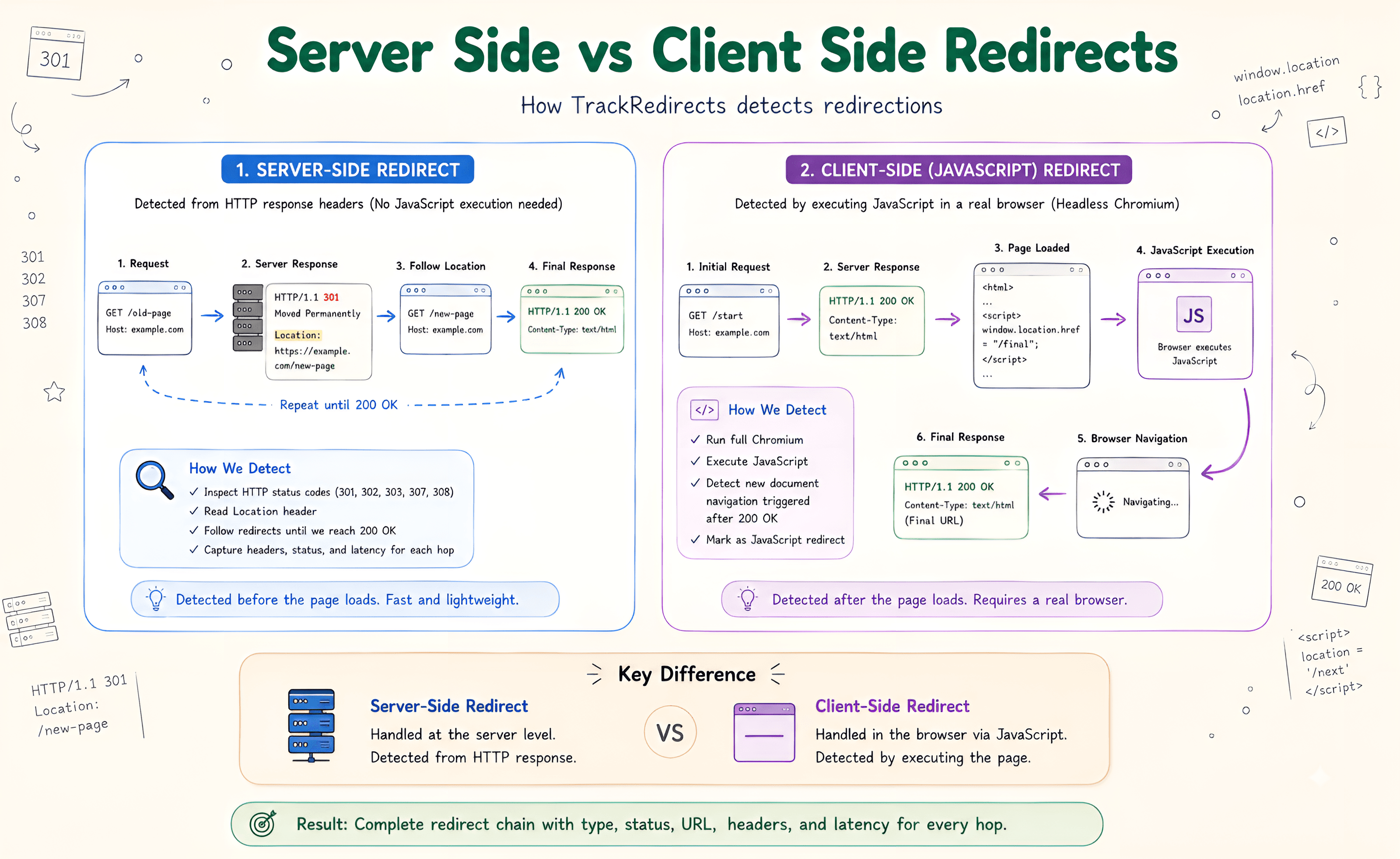
A server redirect is sent in the HTTP response before the page is rendered. A JavaScript redirect works after the page has loaded and the browser has executed the script.
For users, the difference may be almost invisible. For crawlers, it means two very different things are happening.
Server vs Client Redirect Mechanics
Server-side redirects include 301, 302, 307, and 308 responses. The server sends the redirect through the HTTP response headers, so the browser or crawler knows where to go before it needs to render the page.
A JavaScript redirect takes a different route. The server returns the page first, then JavaScript changes the browser location.
A common example is:
window.location.href = "/new-page";The browser has to load the page and execute that code before the redirect takes place.
That's the main technical difference between the two approaches.
How Googlebot Handles JavaScript Redirects
Googlebot can process JavaScript through its Web Rendering Service (WRS), which uses a headless Chrome environment.
So, yes, Googlebot can follow a JavaScript redirect.
The important part is that it has more work to do.
With a server-side 301, the redirect is already available in the HTTP response. With a JavaScript redirect, Google needs to process the page, execute the relevant JavaScript, and evaluate the resulting DOM before the navigation can be discovered.
That doesn't make every JavaScript redirect an SEO problem. It simply means the redirect depends on another stage of processing that a server redirect doesn't.
Key Technical Differences
| Feature | Server Redirect | JavaScript Redirect |
|---|---|---|
| Where it happens | HTTP response | Page/DOM |
| Common examples | 301, 302, 307, 308 | window.location.href |
| HTML rendering | Not required | Required |
| JavaScript execution | Not required | Required |
| Works with cURL | Yes | No JavaScript execution |
| Crawler processing | Direct | Requires rendering |
Crawl Speed
A server-side redirect can be handled as soon as the HTTP response arrives.
A JavaScript redirect has to wait for the page and script to be processed first. In a large site with lots of JavaScript, that extra dependency is worth keeping in mind.
Client Compatibility
Server redirects work at the HTTP level. Browsers, crawlers, monitoring tools, and simple clients such as cURL can understand them without running JavaScript.
A JavaScript redirect needs an environment capable of executing the code.
Which One Should You Use?
For a normal URL migration, a server-side redirect is usually the better option.
If an old page has permanently moved to a new URL, a 301 communicates that change directly to the client and search crawler.
Server redirects are particularly useful when:
- A URL has permanently changed.
- You're restructuring a website.
- You're moving content to a new URL.
- You're migrating a site.
- You need the redirect to happen before HTML rendering.
JavaScript redirects still have their place, especially in applications where navigation is controlled by client-side code. The problem comes when JavaScript is being used simply because a proper server redirect wasn't implemented.
If you have access to the server configuration and you're handling a straightforward permanent URL move, there is usually little reason to add the extra rendering step.
How to Test a JavaScript Redirect
This is where a regular redirect checker can sometimes leave you with an incomplete picture.
If the server returns a normal 200 response and JavaScript sends the browser somewhere else, the redirect isn't visible in the initial HTTP headers.
A JavaScript Redirect Checker can load the page in a headless Chrome environment and watch for client-side navigation, including changes triggered through window.location.
When testing a URL, check both sides:
- What does the initial HTTP response return?
- Does JavaScript trigger a redirect?
- Where does the browser finally land?
- Are there any additional redirects after that?
This is often enough to explain why a URL appears to redirect in Chrome but doesn't show a 301 or 302 when you inspect its HTTP response.
JavaScript Redirect Checker
Run headless Chrome CDP to catch client-side window.location redirects and test what Googlebot sees.