

Why Redirect Types Matter
When you're migrating a site, renaming a product URL, or merging two old blog posts into one, the redirecting method you choose is one of those small technical decisions that quietly has a big effect later. A visitor won't notice anything different — both a 301 and a 302 land them on the destination page just as fast, with no visible delay or extra click. Search engines, on the other hand, read the two status codes as completely different instructions.
Send the wrong one, and Google can end up keeping an outdated URL in its index long after you meant to retire it, or hold back ranking signals that should have moved over to the new page. It's an easy mistake to make, because from a user's perspective the two redirects look identical — the difference only shows up in how a crawler interprets what you told it.
HTTP 301: Moved Permanently
A 301 tells anything that receives it — a browser, a proxy, a search engine crawler — that the page has permanently moved and that all future requests should be directed to the new URL. It's the "this isn't coming back" redirect.
That permanence is exactly what gives it its SEO weight:
- It carries link authority with it. A 301 passes the large majority of a page's accumulated ranking signals — commonly cited in the 90-99% range — over to the new URL, rather than leaving that value stranded on a page that no longer exists.
- It replaces the old URL in the index, not just adds a new one. Google treats a 301 as confirmation that the old address should be swapped out for the new one, rather than keeping both around.
- Browsers cache it aggressively. Once a browser has seen a 301 for a given URL, it tends to remember the redirect and go straight to the new destination on future visits, without asking your server again — which is good for server load, but also means a mistaken 301 can be sticky and annoying to undo.
A 301 is the right call whenever the move is actually permanent: switching a site over to HTTPS, moving to a new domain, cleaning up a URL structure (say, collapsing /blog/2024/post-name down to /blog/post-name), or retiring a product page for good and folding its authority into the parent category it belonged to.
HTTP 302: Found (Temporary)
A 302 says almost the opposite: the resource is currently sitting somewhere else, but that's not a permanent state, so keep using the original URL going forward. It's the "just for now" redirect.
That temporariness changes how it's treated:
- The original URL stays in the index. Google generally keeps showing and indexing the original address, rather than swapping it out for the destination — which is exactly what you want if the destination is only relevant for a little while.
- Authority mostly stays put. Link equity tends to remain associated with the original URL rather than transferring to the temporary destination, at least in the short-to-medium term. If a 302 sticks around for many months without changing back, Google has been known to start treating it more like a permanent move regardless of the status code — which is really an argument for not leaving "temporary" redirects in place indefinitely.
- Browsers don't cache it. Every visit re-checks with your server rather than assuming the redirect is still valid, which makes sense for something that's expected to change back.
A 302 fits situations where the destination genuinely isn't permanent: a seasonal promotional landing page, an A/B test variant, routing an out-of-stock product to a substitute while it's unavailable, or a geo-based redirect that depends on where the visitor is connecting from and could point somewhere different tomorrow.
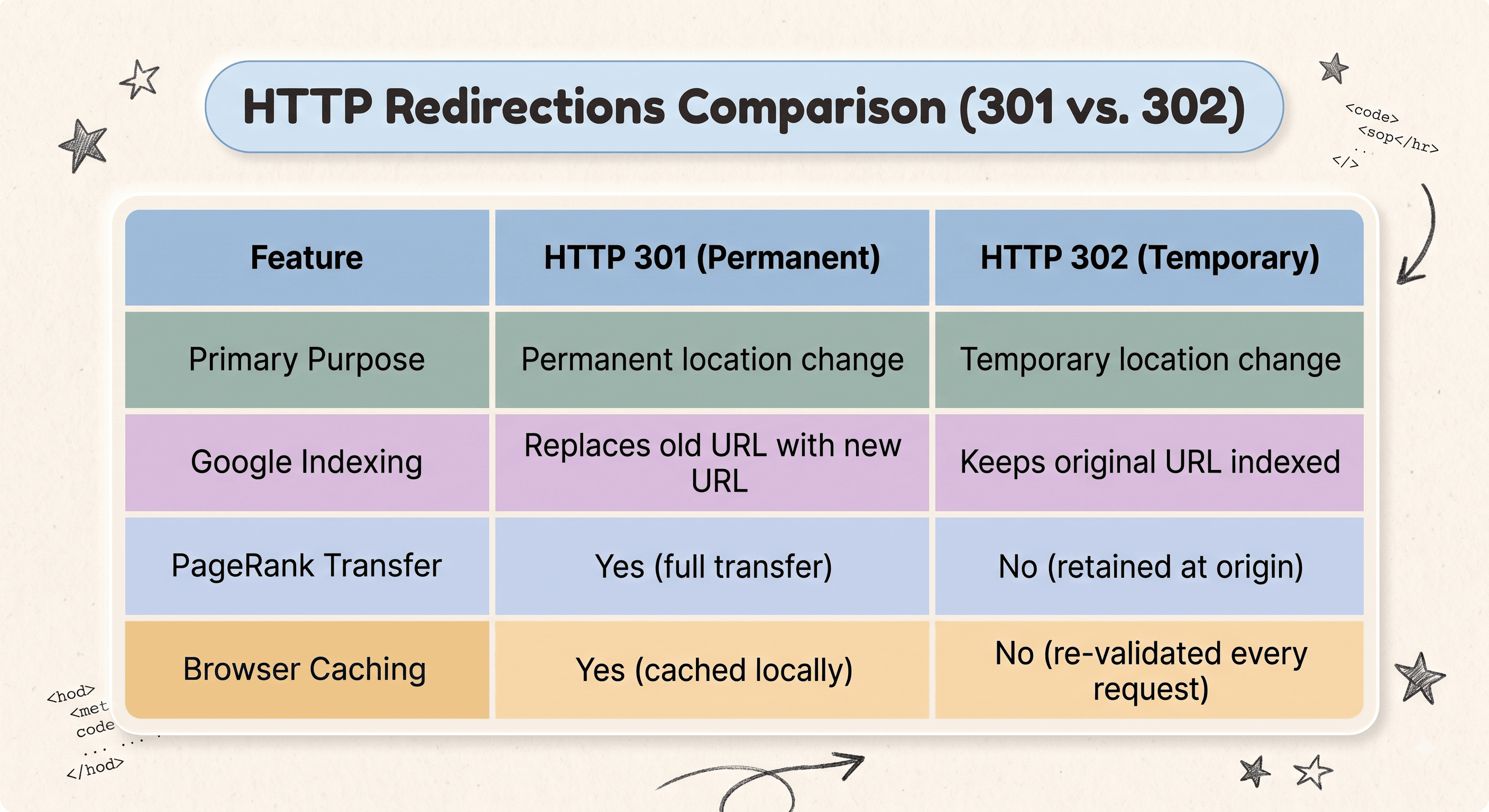
301 vs 302 at a Glance
The pattern underneath all four rows is the same idea said four different ways: a 301 tells everyone to move on, a 302 tells everyone to hang on to the original for now. Once that's clear, the right choice for any given redirect usually falls out pretty naturally.
Where 307 and 308 Fit In
301 and 302 have been around since the early days of HTTP, and they carry an old quirk with them: technically, neither status code strictly requires a browser to preserve the original request method. In practice, this meant that some browsers, when they hit a redirect on a form submission (a POST request), would silently convert it into a GET request on the new URL — which could mean a form submission or an API call didn't behave the way the developer expected on the other side of the redirect.
HTTP 307 (Temporary Redirect) and HTTP 308 (Permanent Redirect) exist specifically to close that gap. They mean exactly what 302 and 301 mean in terms of permanence, with one difference: the request method must be preserved exactly, no silent conversion allowed. If your redirect sits behind a form submission, an API endpoint, or anything else where the HTTP method genuinely matters, 307 and 308 are the safer, more modern choice over their older counterparts.
How to Audit What Your Site Is Actually Sending
Here's the part that trips people up most often: what you think your server is sending and what it's actually sending aren't always the same thing. A CMS plugin, a CDN rule, or a leftover config from an old migration can quietly issue a 302 where you meant a 301 — and because both redirects look identical to a human visitor, nobody notices until rankings shift for reasons that don't seem to have an obvious cause.
The only reliable way to know is to check the actual response headers, not just confirm that a redirect happens. A redirect checker does exactly that — it runs the request and shows you the precise status code your server returned, so you can confirm a permanent move really is being sent as a 301, and catch any redirect that's quietly still marked temporary long after it should have been made permanent. If you're dealing with more than one hop, a redirect chain checker will show you the status code at every step, since a chain can easily mix 301s and 302s together without anyone intending it.
Redirect Status Checker
Test any URL in real-time to inspect exact HTTP 301, 302, 307, or 308 headers and verify PageRank equity flow.